rbuild
Build, run & test packages on a matrix of VPS easily
Usage
See exemple for reference code used in the demonstrations
Nix packaging
Check out the NixOS website

Ansible packaging
Check out the Ansible documentation

CLI
rbuild {nix,ansible,test} [-h] [-f FOLDER] [-c CONFIG] [-v] [-V]
Subcommands
| Command | Description |
|---|---|
| test | Test the SSH connection to the remotes |
| nix | Build the project on remotes, using Nix derivation |
| ansible | Build the project on remotes, using Ansible playbook |
Options
| Short | Long | Description |
|---|---|---|
| -h | –help | Show the help message |
| -f | –folder FOLDER | Path to the folder containing the project to build/test |
| -c | –config CONFIG | Path to the configuration file |
| -v | –verbose | Enable verbose output |
| -V | –version | Show the version number and exit |
Exemples
# Test the connection on the remotes
./rbuild test

# Build the project remotely using Nix
./rbuild.py nix --folder test-project/

# Build the project remotely using Nix
./rbuild.py ansible --folder test-project/ --verbose
Config
config.json
{
    "version": "v1",
    "vps" : [
        {
            "name" : "my_x86-64_vps",
            "ip" : "0.0.0.0",
            "user" : "admin"
        },
        {
            "name" : "my_aarch64_vps",
            "ip" : "0.0.0.0",
            "user" : "cooluser"
        }
    ]
}
Exemple project
Only one of default.nix or build.yml is required
main.c
#include <stdio.h>
#include <stdlib.h>

int main() {

  #if defined __x86_64__
    int result = system("cowsay 'Hello world from x86-64'");
  #elif defined __aarch64__
    int result = system("cowsay 'Hello world from aarch64'");
  #else
    int result = system("cowsay 'Hello world from a weird architecture'");
  #endif

  if (result == -1) {
    fprintf(stderr, "Error: Failed to execute cowsay\n");
    return 1;
  }
}
default.nix
{ pkgs ? import <nixpkgs> {} }:

pkgs.stdenv.mkDerivation {
  pname = "exemple-c";
  version = "0.0.1";

  src = ./.;
  nativeBuildInputs = [ pkgs.makeWrapper ];
  buildInputs = [ pkgs.cowsay ];


  buildPhase = ''
    gcc -o exemple-c main.c
  '';

  postFixup = ''
    wrapProgram "$out/bin/exemple-c" \
      --prefix PATH : ${ pkgs.lib.makeBinPath [ pkgs.cowsay ] }
  '';

  doCheck = true;
  checkPhase = ''
    ./exemple-c
  '';

  installPhase = ''
    mkdir -p $out/bin/
    cp exemple-c $out/bin/
  '';

}
build.yml
---
- name: Ensure GCC is installed
  ansible.builtin.package:
    name: gcc
    state: present
  become: true

- name: Ensure cowsay is installed
  ansible.builtin.package:
    name: cowsay
    state: present
  become: true

- name: Compile the C program (gcc -o exemple-c main.c)
  ansible.builtin.command:
    cmd: gcc -o exemple-c main.c
    chdir: /tmp/rbuild/test-project/
  register: compile_result

- name: Run compiled program (./exemple-c)
  ansible.builtin.command:
    cmd: ./exemple-c
    chdir: /tmp/rbuild/test-project/
  register: check_result

- name: Display check result
  ansible.builtin.debug:
    msg: "Test output (checkPhase): {{ check_result.stdout }}"

- name: Clean up temporary build directory
  ansible.builtin.file:
    path: /tmp/rbuild/test-project
    state: absent
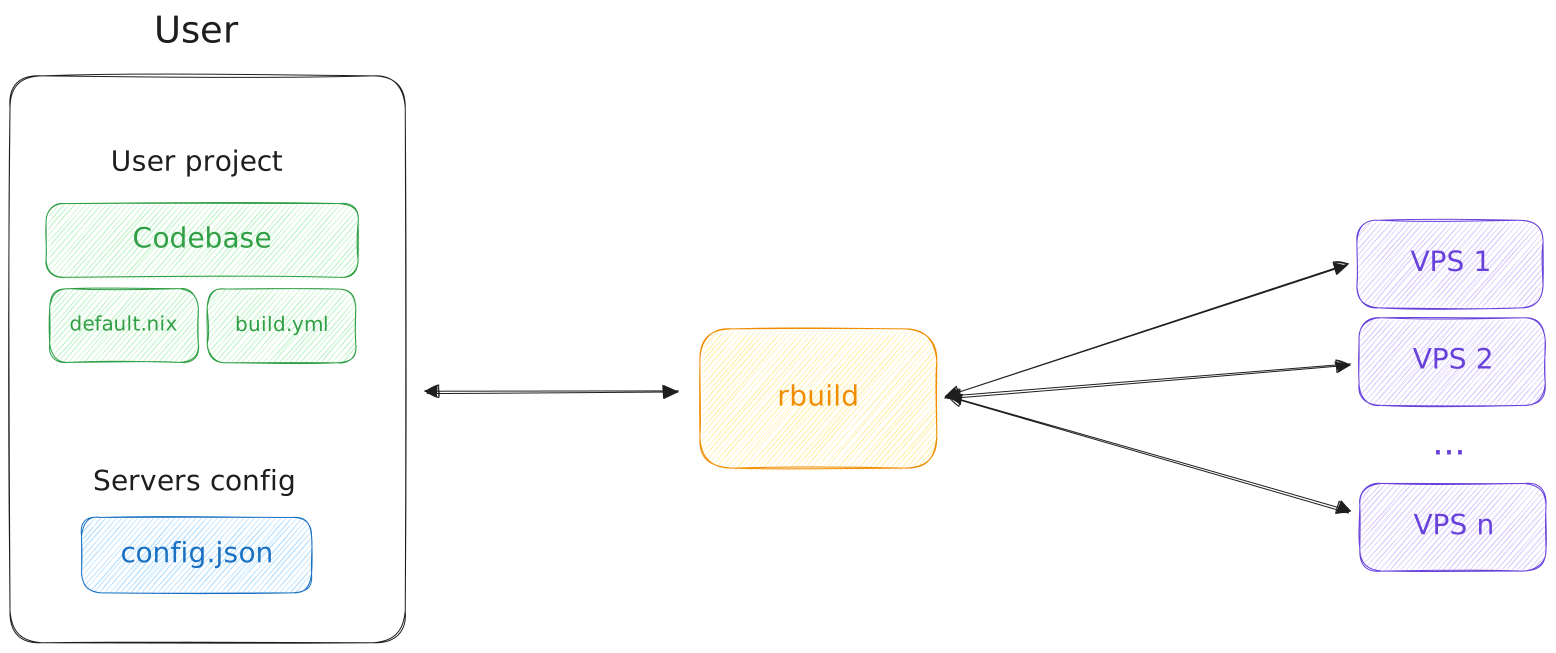
Architecture
Ansible
Require a file build.yml at the root of the project
You must have ansible installed on your machine, check installation steps
Flow
rbuild will autogenerate two files:
rbuild_inventory.inithat contain the servers from yourconfig.jsonrbuild_playbook.ymlthat will import yourbuild.ymland run a few setup tasks beforehand Both files will get removed automatically at the end of the script
rbuild handle the calling of ansible-playbook, make sure this command is available in your $PATH.
Afterwards, you will get a summary of which server was able to build the package, and for thoses that failed, the error message received. Check out the demo here
Nix
Require a file default.nix at the root of the project
You must have nix installed on all servers, check installation steps
Flow
rbuild will send your project to all remotes via scp in a temporary folder
It will initiate a SSH connection to all servers, and nix-build the package
For any failure, it will also run nix-store -l [DERIVATION]
Afterwards, you will get a summary of which server was able to build the package, and for thoses that failed, the error message received. Check out the demo here